

檔案 I/O
Bun 提供了一組經過最佳化的 API 用於讀取和寫入檔案。
讀取檔案 (Bun.file())
Bun.file(path): BunFile
使用 Bun.file(path) 函式建立一個 BunFile 例項。BunFile 表示一個延遲載入的檔案;初始化它不會從磁碟讀取檔案。
const foo = Bun.file("foo.txt"); // 相對於當前工作目錄
foo.size; // 位元組數
foo.type; // MIME 型別
該引用符合 Blob 介面,因此你可以使用多種格式讀取內容。
const foo = Bun.file("foo.txt");

await foo.text(); // 內容作為字串
await foo.json(); // 內容作為 JSON 物件
foo.stream(); // 內容作為 ReadableStream
await foo.arrayBuffer(); // 內容作為 ArrayBuffer
await foo.bytes(); // 內容作為 Uint8Array
你也可以從數字形式的檔案描述符或 file:// URL 建立檔案引用。
Bun.file(1234);
Bun.file(new URL(import.meta.url)); // 當前檔案的引用
BunFile 可以指向磁碟上不存在檔案的位置。
const notreal = Bun.file("notreal.txt");
notreal.size; // 0
notreal.type; // "text/plain;charset=utf-8"
const exists = await notreal.exists(); // false
預設 MIME 型別為 text/plain;charset=utf-8。通過向 Bun.file 傳入第二個引數可以覆蓋該型別。
const notreal = Bun.file("notreal.json", { type: "application/json" });
notreal.type; // => "application/json;charset=utf-8"
為了方便,Bun 將 stdin、stdout 和 stderr 作為 BunFile 例項暴露。
Bun.stdin; // 只讀
Bun.stdout;
Bun.stderr;
刪除檔案 (file.delete())
呼叫 .delete() 刪除檔案。
await Bun.file("logs.json").delete();
寫入檔案 (Bun.write())
Bun.write(destination, data): Promise<number>
Bun.write 是一個多功能工具,用於將各種型別的負載寫入磁碟。
第一個引數是 destination,可以是以下任意型別:
string:檔案系統上的路徑。使用"path"模組進行路徑操作。URL:file://描述符。BunFile:檔案引用。
第二個引數是要寫入的資料,可以是以下任意型別:
stringBlob(包括BunFile)ArrayBuffer或SharedArrayBufferTypedArray(如Uint8Array等)Response
Bun 會針對每種組合,使用當前平臺上可用的最快系統呼叫。
檢視系統呼叫
| 輸出 | 輸入 | 系統呼叫 | 平臺 |
|---|---|---|---|
| 檔案 | 檔案 | copy_file_range | Linux |
| 檔案 | 管道 | sendfile | Linux |
| 管道 | 管道 | splice | Linux |
| 終端 | 檔案 | sendfile | Linux |
| 終端 | 終端 | sendfile | Linux |
| 套接字 | 檔案或管道 | sendfile(如果是 http,則不是 https) | Linux |
| 檔案(不存在) | 檔案(路徑) | clonefile | macOS |
| 檔案(已存在) | 檔案 | fcopyfile | macOS |
| 檔案 | Blob 或字串 | write | macOS |
| 檔案 | Blob 或字串 | write | Linux |
將字串寫入磁碟:
const data = `那是最好的時代,那是最壞的時代。`;
await Bun.write("output.txt", data);
將檔案複製到磁碟上另一個位置:
const input = Bun.file("input.txt");
const output = Bun.file("output.txt"); // 還不存在!
await Bun.write(output, input);
將位元組陣列寫入磁碟:
const encoder = new TextEncoder();
const data = encoder.encode("datadatadata"); // Uint8Array
await Bun.write("output.txt", data);
將檔案內容寫入 stdout:
const input = Bun.file("input.txt");
await Bun.write(Bun.stdout, input);
將 HTTP 響應的正文寫入磁碟:
const response = await fetch("https://bun.sh");
await Bun.write("index.html", response);
使用 FileSink 進行增量寫入
Bun 提供了一個原生的增量寫入檔案 API,叫做 FileSink。從 BunFile 獲取 FileSink 例項:
const file = Bun.file("output.txt");
const writer = file.writer();
增量寫入檔案時,呼叫 .write()。
const file = Bun.file("output.txt");
const writer = file.writer();

writer.write("那是最好的時代\n");
writer.write("那是最壞的時代\n");
FileSink 會在內部緩衝這些資料塊。要將緩衝區重新整理到磁碟,請使用 .flush()。它會傳回已重新整理的位元組數。
writer.flush(); // 將快取寫入磁碟
當 FileSink 達到其_高水位標記_時,緩衝區也會自動重新整理;也就是說,當其內部緩衝區已滿時會自動重新整理。你可以設定此值。
const file = Bun.file("output.txt");
const writer = file.writer({ highWaterMark: 1024 * 1024 }); // 1MB
重新整理快取並關閉檔案:
writer.end();
預設情況下,bun 行程會保持執行,直到你使用 .end() 顯式關閉此 FileSink。要選擇不採用此行為,請對例項呼叫 "unref"。
writer.unref();

// 之後可再次呼叫以恢復保持行程存活
writer.ref();
目錄操作
Bun 對 node:fs 的實現速度很快。在 Bun 中使用 node:fs 處理目錄。
讀取目錄(readdir)
在 Bun 中,使用 node:fs 模組的 readdir 讀取目錄。
import { readdir } from "node:fs/promises";

// 讀取當前目錄下所有檔案
const files = await readdir(import.meta.dir);
遞迴讀取目錄
使用 readdir 並開啟 recursive: true 遞迴讀取目錄。
import { readdir } from "node:fs/promises";

// 遞迴讀取上級目錄中所有檔案
const files = await readdir("../", { recursive: true });
建立目錄(mkdir)
遞迴建立目錄需使用 node:fs 的 mkdir:
import { mkdir } from "node:fs/promises";

await mkdir("path/to/dir", { recursive: true });
效能基準
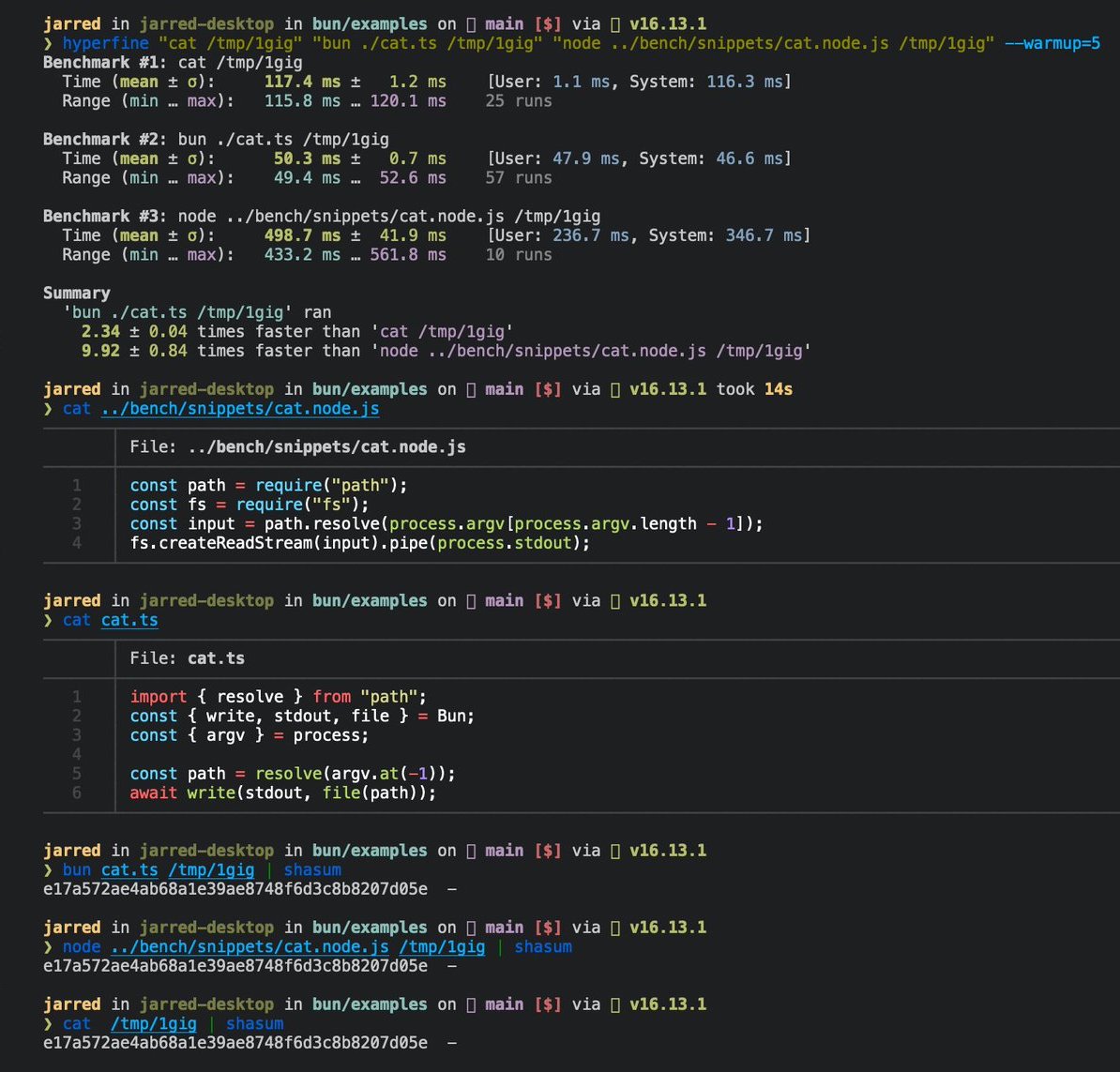
以下是 Linux 下 cat 命令的三行實現。
 cat.ts
// 用法
// bun ./cat.ts ./path-to-file
import { resolve } from "path";
const path = resolve(process.argv.at(-1));
await Bun.write(Bun.stdout, Bun.file(path));
執行該檔案:
bun ./cat.ts ./path-to-file
在 Linux 上處理大檔案時,速度是 GNU cat 的 2 倍。
參考
interface Bun {
  stdin: BunFile;
  stdout: BunFile;
  stderr: BunFile;

  file(path: string | number | URL, options?: { type?: string }): BunFile;

  write(
    destination: string | number | BunFile | URL,
    input: string | Blob | ArrayBuffer | SharedArrayBuffer | TypedArray | Response,
  ): Promise<number>;
}

interface BunFile {
  readonly size: number;
  readonly type: string;

  text(): Promise<string>;
  stream(): ReadableStream;
  arrayBuffer(): Promise<ArrayBuffer>;
  json(): Promise<any>;
  bytes(): Promise<Uint8Array>;
  writer(params?: { highWaterMark?: number }): FileSink;
  exists(): Promise<boolean>;
  delete(): Promise<void>;
}

export interface FileSink {
  write(chunk: string | ArrayBufferView | ArrayBuffer | SharedArrayBuffer): number;
  flush(): number | Promise<number>;
  end(error?: Error): number | Promise<number>;
  start(options?: { highWaterMark?: number }): void;
  ref(): void;
  unref(): void;
}