

File I/O
Bun provides a set of optimized APIs for reading and writing files.
Reading files (Bun.file())
Bun.file(path): BunFile
Create a BunFile instance with the Bun.file(path) function. A BunFile represents a lazily-loaded file; initializing it does not read the file from disk.
const foo = Bun.file("foo.txt"); // relative to cwd
foo.size; // number of bytes
foo.type; // MIME type
The reference conforms to the Blob interface, so you can read the contents in various formats.
const foo = Bun.file("foo.txt");

await foo.text(); // contents as a string
await foo.json(); // contents as a JSON object
foo.stream(); // contents as ReadableStream
await foo.arrayBuffer(); // contents as ArrayBuffer
await foo.bytes(); // contents as Uint8Array
You can also create file references from numerical file descriptors or file:// URLs.
Bun.file(1234);
Bun.file(new URL(import.meta.url)); // reference to the current file
A BunFile can point to a location on disk where a file does not exist.
const notreal = Bun.file("notreal.txt");
notreal.size; // 0
notreal.type; // "text/plain;charset=utf-8"
const exists = await notreal.exists(); // false
The default MIME type is text/plain;charset=utf-8. Override it by passing a second argument to Bun.file.
const notreal = Bun.file("notreal.json", { type: "application/json" });
notreal.type; // => "application/json;charset=utf-8"
For convenience, Bun exposes stdin, stdout and stderr as instances of BunFile.
Bun.stdin; // readonly
Bun.stdout;
Bun.stderr;
Deleting files (file.delete())
Call .delete() to delete a file.
await Bun.file("logs.json").delete();
Writing files (Bun.write())
Bun.write(destination, data): Promise<number>
The Bun.write function is a multi-tool for writing payloads of all kinds to disk.
The first argument is the destination, which can be any of the following:
string: A path to a location on the file system. Use the"path"module to manipulate paths.URL: Afile://descriptor.BunFile: A file reference.
The second argument is the data to write. It can be any of the following:
stringBlob(includingBunFile)ArrayBufferorSharedArrayBufferTypedArray(Uint8Array, et. al.)Response
Bun handles each combination with the fastest available system call on the current platform.
See syscalls
| Output | Input | System call | Platform |
|---|---|---|---|
| file | file | copy_file_range | Linux |
| file | pipe | sendfile | Linux |
| pipe | pipe | splice | Linux |
| terminal | file | sendfile | Linux |
| terminal | terminal | sendfile | Linux |
| socket | file or pipe | sendfile (if http, not https) | Linux |
| file (doesn't exist) | file (path) | clonefile | macOS |
| file (exists) | file | fcopyfile | macOS |
| file | Blob or string | write | macOS |
| file | Blob or string | write | Linux |
To write a string to disk:
const data = `It was the best of times, it was the worst of times.`;
await Bun.write("output.txt", data);
To copy a file to another location on disk:
const input = Bun.file("input.txt");
const output = Bun.file("output.txt"); // doesn't exist yet!
await Bun.write(output, input);
To write a byte array to disk:
const encoder = new TextEncoder();
const data = encoder.encode("datadatadata"); // Uint8Array
await Bun.write("output.txt", data);
To write a file to stdout:
const input = Bun.file("input.txt");
await Bun.write(Bun.stdout, input);
To write the body of an HTTP response to disk:
const response = await fetch("https://bun.sh");
await Bun.write("index.html", response);
Incremental writing with FileSink
Bun provides a native incremental file writing API called FileSink. To retrieve a FileSink instance from a BunFile:
const file = Bun.file("output.txt");
const writer = file.writer();
To incrementally write to the file, call .write().
const file = Bun.file("output.txt");
const writer = file.writer();

writer.write("it was the best of times\n");
writer.write("it was the worst of times\n");
The FileSink buffers these chunks internally. To flush the buffer to disk, use .flush(). This returns the number of flushed bytes.
writer.flush(); // write buffer to disk
The buffer also auto-flushes when the FileSink's high water mark is reached; that is, when its internal buffer is full. You can configure this value.
const file = Bun.file("output.txt");
const writer = file.writer({ highWaterMark: 1024 * 1024 }); // 1MB
To flush the buffer and close the file:
writer.end();
By default, the bun process stays alive until you explicitly close this FileSink with .end(). To opt out of this behavior, "unref" the instance.
writer.unref();

// to "re-ref" it later
writer.ref();
Directories
Bun's implementation of node:fs is fast. Use node:fs for working with directories in Bun.
Reading directories (readdir)
To read a directory in Bun, use readdir from node:fs.
import { readdir } from "node:fs/promises";

// read all the files in the current directory
const files = await readdir(import.meta.dir);
Reading directories recursively
To recursively read a directory in Bun, use readdir with recursive: true.
import { readdir } from "node:fs/promises";

// read all the files in the current directory, recursively
const files = await readdir("../", { recursive: true });
Creating directories (mkdir)
To recursively create a directory, use mkdir in node:fs:
import { mkdir } from "node:fs/promises";

await mkdir("path/to/dir", { recursive: true });
Benchmarks
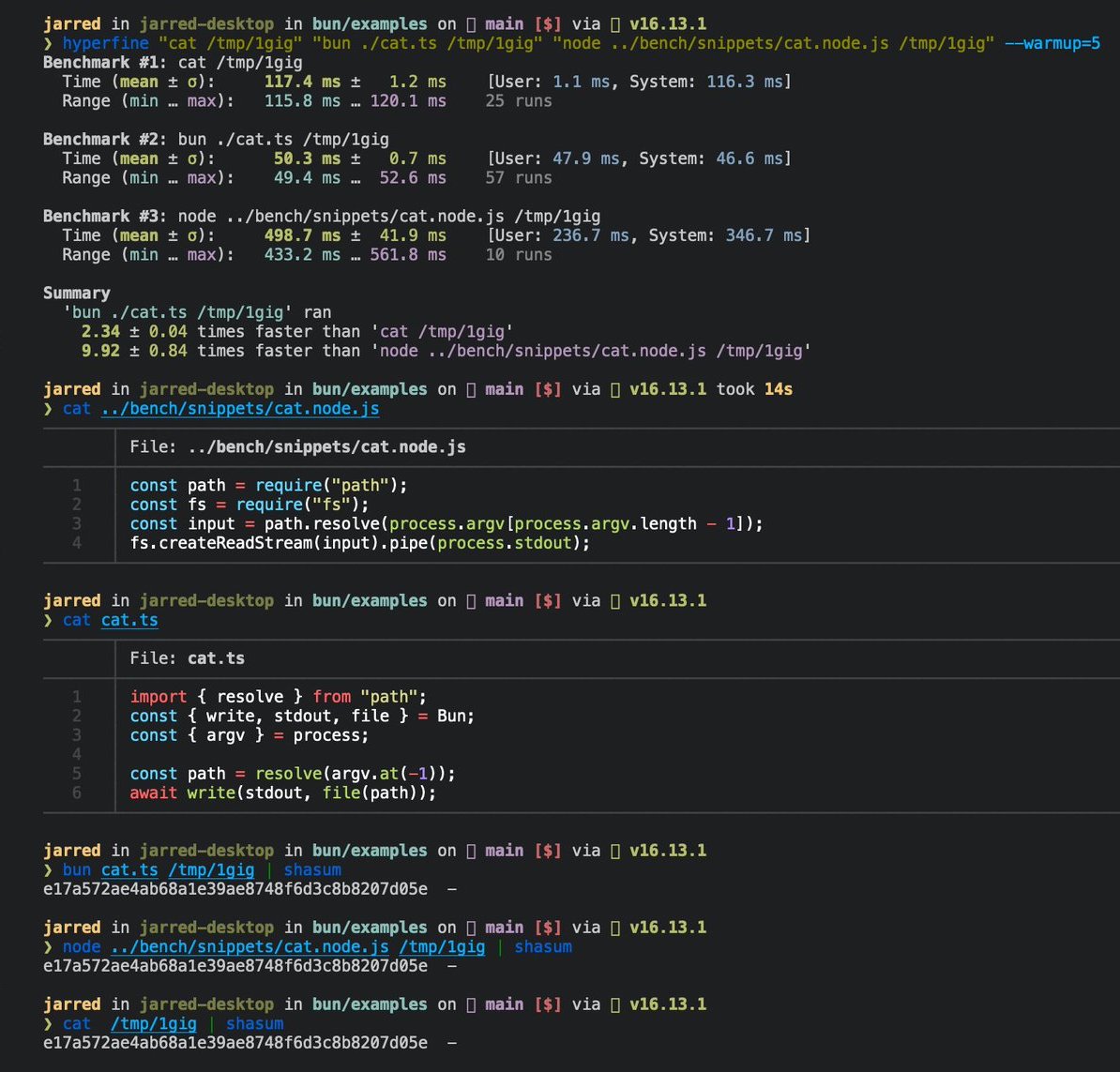
The following is a 3-line implementation of the Linux cat command.
 cat.ts
// Usage
// bun ./cat.ts ./path-to-file
import { resolve } from "path";
const path = resolve(process.argv.at(-1));
await Bun.write(Bun.stdout, Bun.file(path));
To run the file:
bun ./cat.ts ./path-to-file
It runs 2x faster than GNU cat for large files on Linux.
Reference
interface Bun {
  stdin: BunFile;
  stdout: BunFile;
  stderr: BunFile;

  file(path: string | number | URL, options?: { type?: string }): BunFile;

  write(
    destination: string | number | BunFile | URL,
    input: string | Blob | ArrayBuffer | SharedArrayBuffer | TypedArray | Response,
  ): Promise<number>;
}

interface BunFile {
  readonly size: number;
  readonly type: string;

  text(): Promise<string>;
  stream(): ReadableStream;
  arrayBuffer(): Promise<ArrayBuffer>;
  json(): Promise<any>;
  bytes(): Promise<Uint8Array>;
  writer(params?: { highWaterMark?: number }): FileSink;
  exists(): Promise<boolean>;
  delete(): Promise<void>;
}

export interface FileSink {
  write(chunk: string | ArrayBufferView | ArrayBuffer | SharedArrayBuffer): number;
  flush(): number | Promise<number>;
  end(error?: Error): number | Promise<number>;
  start(options?: { highWaterMark?: number }): void;
  ref(): void;
  unref(): void;
}