

除錯
使用 WebKit Inspector 協議,通過互動式偵錯程式除錯你的 Bun 程式碼
Bun 使用 WebKit Inspector Protocol,因此你可以使用互動式偵錯程式來除錯你的程式碼。為了演示效果,請考慮下面的範例 Web 伺服器。
除錯 JavaScript 和 TypeScript
 server.ts
Bun.serve({
fetch(req) {
console.log(req.url);
return new Response("Hello, world!");
},
});
--inspect
要在使用 Bun 執行程式碼時啟用除錯,請使用 --inspect 標誌。此標誌會在可用埠上啟動一個 WebSocket 伺服器,用於檢查正在執行的 Bun 行程。
bun --inspect server.ts
--------------------- Bun Inspector ---------------------
Listening:
  ws://localhost:6499/0tqxs9exrgrm
Inspect in browser:
  https://debug.bun.sh/#localhost:6499/0tqxs9exrgrm
--------------------- Bun Inspector ---------------------
--inspect-brk
--inspect-brk 標誌的行為與 --inspect 完全相同,不同之處在於,它會在執行指令碼的第一行注入一個斷點。對於執行速度很快並會立即退出的指令碼,可以使用此標誌進行除錯。
--inspect-wait
--inspect-wait 標誌的行為與 --inspect 完全相同,不同之處在於,直到偵錯程式連線到正在執行的行程後,程式碼才會執行。
為偵錯程式設定埠或 URL
無論使用哪個標誌,都可以指定埠號、URL 字首,或同時指定兩者。
bun --inspect=4000 server.ts
bun --inspect=localhost:4000 server.ts
bun --inspect=localhost:4000/prefix server.ts
偵錯程式
有多種除錯工具可以連線到此伺服器。
debug.bun.sh
Bun 在 debug.bun.sh 上提供了一個基於 Web 的偵錯程式。它是 WebKit 的 Web Inspector Interface 的修改版本,Safari 使用者會對它感到熟悉。
在瀏覽器中開啟提供的 debug.bun.sh URL,即可開始除錯會話。在此介面中,你可以檢視正在執行的檔案的原始碼、檢視和設定斷點,並使用內建控制台執行程式碼。
開啟 Sources 標籤頁;你應該能看到之前的程式碼。點選行號 3,在 console.log(req.url) 語句上設定斷點。
然後在 Web 瀏覽器中訪問 http://localhost:3000。頁面會一直載入,因為程式已在斷點處暫停。
注意介面發生的變化。
暫停期間,使用底部的控制台在程式上下文中執行任意程式碼,並可以完全訪問斷點處作用域內的變數。
Sources 面板的右側會列出當前作用域內的所有區域性變數。展開其中一個變數,例如這裡的 req,即可檢視其屬性和方法。
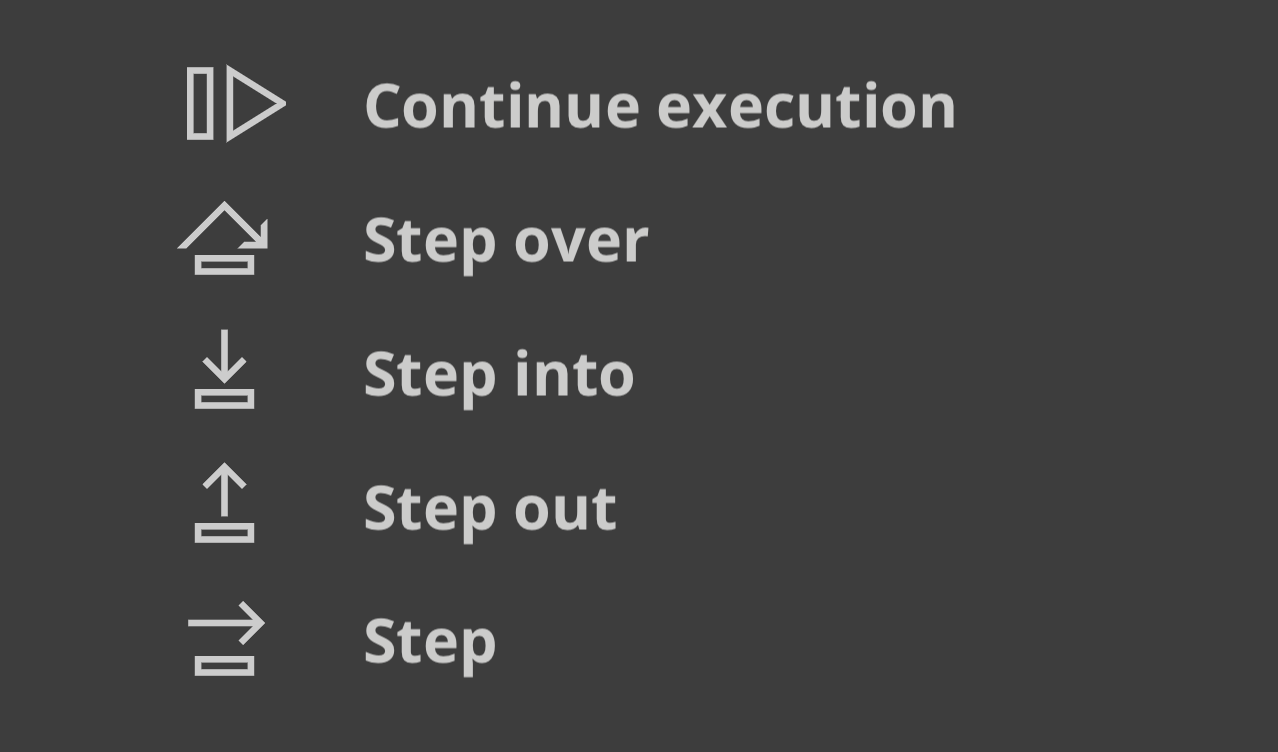
Sources 面板左上方的控制元件用於控制程式的執行。
每個按鈕的功能如下:
- 繼續執行指令碼 — 執行至下一個斷點或異常處。
- 單步跳過 — 執行至下一行。
- 單步進入 — 如果當前語句包含函式呼叫,則進入被呼叫的函式。
- 單步跳出 — 如果當前語句是函式呼叫,則執行完該呼叫,然後傳回呼叫它的位置。
Visual Studio Code 偵錯程式
Visual Studio Code 對 Bun 指令碼的除錯支援仍處於實驗階段。要使用此功能,請安裝 Bun VSCode 擴充套件。
除錯網路請求
設定 BUN_CONFIG_VERBOSE_FETCH 環境變數,以記錄通過 fetch() 或 node:http 發出的網路請求。
| 值 | 描述 |
|---|---|
curl | 將請求列印為 curl 命令 |
true | 列印請求和響應資訊 |
false | 不列印任何內容(預設) |
以 curl 命令列印 fetch 和 node:http 請求
將 BUN_CONFIG_VERBOSE_FETCH 設定為 curl,即可將每個 fetch() 和 node:http 請求列印為單行 curl 命令。你可以將該命令複製並貼上到終端中,以重現此請求。
index.tsprocess.env.BUN_CONFIG_VERBOSE_FETCH = "curl";
await fetch("https://example.com", {
method: "POST",
headers: {
"Content-Type": "application/json",
},
body: JSON.stringify({ foo: "bar" }),
});
[fetch] $ curl --http1.1 "https://example.com/" -X POST -H "content-type: application/json" -H "Connection: keep-alive" -H "User-Agent: Bun/1.3.3" -H "Accept: */*" -H "Host: example.com" -H "Accept-Encoding: gzip, deflate, br" --compressed -H "Content-Length: 13" --data-raw "{\"foo\":\"bar\"}"
[fetch] > HTTP/1.1 POST https://example.com/
[fetch] > content-type: application/json
[fetch] > Connection: keep-alive
[fetch] > User-Agent: Bun/1.3.3
[fetch] > Accept: */*
[fetch] > Host: example.com
[fetch] > Accept-Encoding: gzip, deflate, br
[fetch] > Content-Length: 13

[fetch] < 200 OK
[fetch] < Accept-Ranges: bytes
[fetch] < Cache-Control: max-age=604800
[fetch] < Content-Type: text/html; charset=UTF-8
[fetch] < Date: Tue, 18 Jun 2024 05:12:07 GMT
[fetch] < Etag: "3147526947"
[fetch] < Expires: Tue, 25 Jun 2024 05:12:07 GMT
[fetch] < Last-Modified: Thu, 17 Oct 2019 07:18:26 GMT
[fetch] < Server: EOS (vny/044F)
[fetch] < Content-Length: 1256
以 [fetch] > 標記的行是原生代碼發出的請求,以 [fetch] < 標記的行是遠端伺服器的響應。
若要在不列印 curl 命令的情況下輸出日誌,請將 BUN_CONFIG_VERBOSE_FETCH 設定為 true。
index.tsprocess.env.BUN_CONFIG_VERBOSE_FETCH = "true";
await fetch("https://example.com", {
method: "POST",
headers: {
"Content-Type": "application/json",
},
body: JSON.stringify({ foo: "bar" }),
});
[fetch] > HTTP/1.1 POST https://example.com/
[fetch] > content-type: application/json
[fetch] > Connection: keep-alive
[fetch] > User-Agent: Bun/1.3.3
[fetch] > Accept: */*
[fetch] > Host: example.com
[fetch] > Accept-Encoding: gzip, deflate, br
[fetch] > Content-Length: 13

[fetch] < 200 OK
[fetch] < Accept-Ranges: bytes
[fetch] < Cache-Control: max-age=604800
[fetch] < Content-Type: text/html; charset=UTF-8
[fetch] < Date: Tue, 18 Jun 2024 05:12:07 GMT
[fetch] < Etag: "3147526947"
[fetch] < Expires: Tue, 25 Jun 2024 05:12:07 GMT
[fetch] < Last-Modified: Thu, 17 Oct 2019 07:18:26 GMT
[fetch] < Server: EOS (vny/044F)
[fetch] < Content-Length: 1256
堆疊跟蹤和 sourcemaps
Bun 會轉譯每個檔案,這可能導致堆疊跟蹤指向轉譯後的輸出。為避免這種情況,Bun 會為它轉譯的每個檔案生成並提供帶 sourcemap 的檔案。當你在控制台中看到堆疊跟蹤時,可以點選檔案路徑並跳轉到原始原始碼,即使該程式碼是用 TypeScript 或 JSX 編寫的,或者經過了其他轉換。
Bun 在按需轉譯檔案時會在執行環境載入 sourcemaps;使用 bun build 預先編譯檔案時也會載入 sourcemaps。
帶語法高亮的原始碼預覽
Bun 會在發生未處理的異常或拒絕時列印一小段原始碼預覽。要自行生成相同的輸出,請呼叫 Bun.inspect(error):
// 建立一個錯誤
const err = new Error("Something went wrong");
console.log(Bun.inspect(err, { colors: true }));
輸出內容包括髮生錯誤位置的帶語法高亮的原始碼預覽,以及錯誤訊息和堆疊跟蹤。
1 | // 建立一個錯誤
2 | const err = new Error("Something went wrong");
                    ^
error: Something went wrong
      at /path/to/file.js:2:17
V8 堆疊跟蹤
Bun 使用 JavaScriptCore 作為其引擎,但 Node.js 生態系統和 npm 中的許多內容都相依 V8。JavaScript 引擎在格式化 error.stack 的方式上各不相同。由於 Bun 旨在成為 Node.js 的直接替代品,因此它會像 V8 一樣格式化 error.stack。使用相依 V8 堆疊跟蹤的庫時,這一點尤為重要。
V8 堆疊跟蹤 API
Bun 實現了 V8 堆疊跟蹤 API,這是一組用於操作堆疊跟蹤的函式。
Error.prepareStackTrace
定義一個全域性的 Error.prepareStackTrace 函式,以自定義堆疊跟蹤輸出。它接收錯誤物件和一個 CallSite 物件陣列,其傳回值會成為 error.stack。
Error.prepareStackTrace = (err, stack) => {
  return stack.map(callSite => {
    return callSite.getFileName();
  });
};

const err = new Error("Something went wrong");
console.log(err.stack);
// [ "error.js" ]
CallSite 物件的可用方法如下:
| 方法 | 傳回值 |
|---|---|
getThis | 函式呼叫中的 this 值 |
getTypeName | this 的型別名 |
getFunction | 函式物件 |
getFunctionName | 函式名稱,字串 |
getMethodName | 方法名稱,字串 |
getFileName | 檔名或 URL |
getLineNumber | 行號 |
getColumnNumber | 列號 |
getEvalOrigin | undefined |
getScriptNameOrSourceURL | 原始碼 URL |
isToplevel | 如果函式在全域性作用域中,傳回 true |
isEval | 如果函式是 eval 呼叫,傳回 true |
isNative | 如果函式是原生的,傳回 true |
isConstructor | 如果函式是建構函式,傳回 true |
isAsync | 如果函式是 async,傳回 true |
isPromiseAll | 尚未實現 |
getPromiseIndex | 尚未實現 |
toString | 傳回呼叫位置的字串描述 |
如果 Function 物件已經被垃圾回收,其中一些方法會傳回 undefined。
Error.captureStackTrace(error, startFn)
Error.captureStackTrace 會在程式碼中的特定位置捕獲堆疊跟蹤,而不是在丟擲錯誤的位置捕獲。
當回撥或非同步程式碼使錯誤來源難以確定時,這會很有幫助。Error.captureStackTrace 的第 2 個引數是你希望堆疊跟蹤從其開始的函式。
在以下範例中,err.stack 指向呼叫 fn() 的程式碼,儘管錯誤是在 myInner 中丟擲的。
index.tsconst fn = () => {
function myInner() {
throw new Error("here!");
}
try {
myInner();
} catch (err) {
console.log(err.stack);
console.log("");
console.log("-- captureStackTrace --");
console.log("");
Error.captureStackTrace(err, fn);
console.log(err.stack);
}
};
fn();
Error: here!
    at myInner (/path/to/index.ts:3:15)
    at fn (/path/to/index.ts:7:5)
    at /path/to/index.ts:18

-- captureStackTrace --

Error: here!
    at /path/to/index.ts:18