

打包器
Bun 的快速原生打包器,支援 JavaScript、TypeScript、JSX 等多種語言
通過 bun build CLI 命令或 Bun.build() JavaScript API 使用 Bun 的原生打包器。
一覽
- JS API:
await Bun.build({ entrypoints, outdir }) - CLI:
bun build <入口檔案> --outdir ./out - 監視:
--watch實現增量重建 - 目標環境:
--target browser|bun|node - 格式:
--format esm|cjs|iife(cjs/iife 為實驗性功能)
 build.ts
await Bun.build({
entrypoints: ['./index.tsx'],
outdir: './build',
});
bun build ./index.tsx --outdir ./build
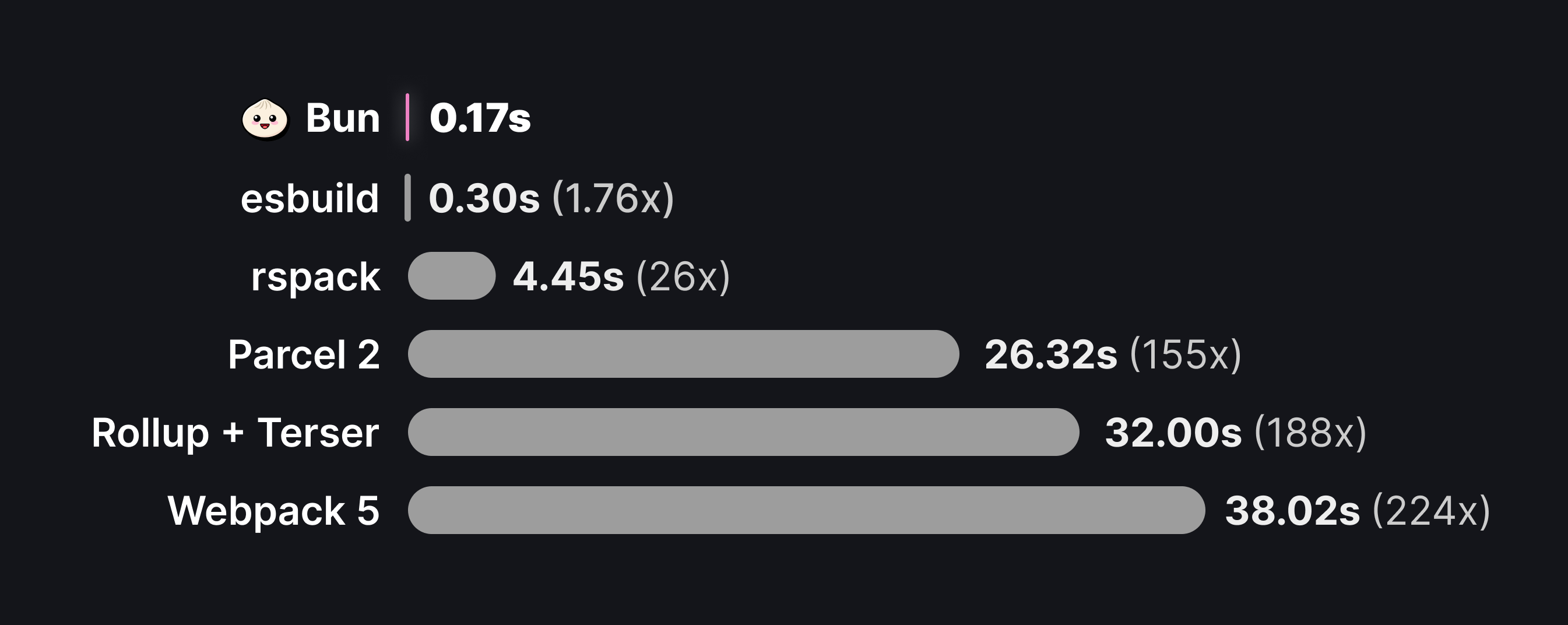
它的速度很快。以下資料來自 esbuild 的 three.js 基準測試。
為什麼要打包?
打包器可以解決以下幾個問題:
- Reducing HTTP requests. A single package in
node_modulesmay consist of hundreds of files, and large applications may have dozens of such dependencies. Loading each of these files with a separate HTTP request becomes untenable, so bundlers convert your application source code into a smaller number of self-contained "bundles" that can be loaded with a single request. - Code transforms. Modern apps are commonly built with languages or tools like TypeScript, JSX, and CSS modules. All of these must be converted into plain JavaScript and CSS before a browser can consume them. The bundler is the natural place to configure these transformations.
- Framework features. Frameworks rely on bundler plugins & code transformations to implement common patterns like file-system routing, client-server code co-location (think
getServerSidePropsor Remix loaders), and server components. - Full-stack Applications. Bun's bundler can handle both server and client code in a single command, enabling optimized production builds and single-file executables. With build-time HTML imports, you can bundle your entire application — frontend assets and backend server — into a single deployable unit.
基本範例
建置你的第一個 bundle。你有以下兩個檔案,它們實現了一個客戶端渲染的 React 應用。
index.tsximport * as ReactDOM from "react-dom/client";
import { Component } from "./Component";
const root = ReactDOM.createRoot(document.getElementById("root")!);
root.render(<Component message="Sup!" />);
export function Component(props: { message: string }) {
  return <h1>{props.message}</h1>;
}
這裡,index.tsx 是應用的“入口點”:也就是打包器開始處理的檔案。通常,這是一個會執行某些副作用的指令碼,例如啟動伺服器,或者在本例中初始化一個 React 根節點。由於這些檔案使用了 TypeScript 和 JSX,因此必須先進行打包,然後才能傳送到瀏覽器。
要建立 bundle:
build.tsawait Bun.build({
entrypoints: ["./index.tsx"],
outdir: "./out",
});
bun build ./index.tsx --outdir ./out
對於 entrypoints 中指定的每個檔案,Bun 都會生成一個新的 bundle,並將其寫入 ./out 目錄(該路徑相對於當前工作目錄解析)。執行建置命令後,檔案系統如下所示:
.
├── index.tsx
├── Component.tsx
└── out
    └── index.js
out/index.js 的內容大致如下:
 out/index.js
// out/index.js
// ...
// 約 2 萬行程式碼
// 包含 `react-dom/client` 及所有相依的內容
// 這裡定義了 $jsxDEV 和 $createRoot 函式
// Component.tsx
function Component(props) {
return $jsxDEV(
"h1",
{
children: props.message,
},
undefined,
false,
undefined,
this,
);
}
// index.tsx
var rootNode = document.getElementById("root");
var root = $createRoot(rootNode);
root.render(
$jsxDEV(
Component,
{
message: "Sup!",
},
undefined,
false,
undefined,
this,
),
);
監聽模式
和執行環境與測試器一樣,打包器原生支援監聽模式。
bun build ./index.tsx --outdir ./out --watch
支援的內容型別
與 Bun 執行環境一樣,打包器預設支援多種檔案型別。下表列出了打包器的標準“載入器”。參見 載入器。
| 副檔名 | 詳情 |
|---|---|
.js .jsx .cjs .mjs .mts .cts .ts .tsx | Uses Bun's built-in transpiler to parse the file and transpile TypeScript/JSX syntax to vanilla JavaScript. The bundler executes a set of default transforms including dead code elimination and tree shaking. Bun does not down-convert syntax; if you use recent ECMAScript syntax, it appears as-is in the bundled code. |
.json | JSON files are parsed and inlined into the bundle as a JavaScript object.js<br/>import pkg from "./package.json";<br/>pkg.name; // => "my-package"<br/> |
.jsonc | JSON with comments. Files are parsed and inlined into the bundle as a JavaScript object.js<br/>import config from "./config.jsonc";<br/>config.name; // => "my-config"<br/> |
.toml | TOML files are parsed and inlined into the bundle as a JavaScript object.js<br/>import config from "./bunfig.toml";<br/>config.logLevel; // => "debug"<br/> |
.yaml .yml | YAML files are parsed and inlined into the bundle as a JavaScript object.js<br/>import config from "./config.yaml";<br/>config.name; // => "my-app"<br/> |
.txt | The contents of the text file are read and inlined into the bundle as a string.js<br/>import contents from "./file.txt";<br/>console.log(contents); // => "Hello, world!"<br/> |
.html | HTML files are processed and any referenced assets (scripts, stylesheets, images) are bundled. |
.css | CSS files are bundled together into a single .css file in the output directory. |
.node .wasm | The Bun runtime supports these files, but the bundler treats them as assets. |
資原始檔
If the bundler encounters an import with an unrecognized extension, it treats the imported file as an external file. The bundler copies the referenced file as-is into outdir and resolves the import as a path to the file.
Input// bundle入口檔案
import logo from "./logo.svg";
console.log(logo);
// 打包輸出
var logo = "./logo-a7305bdef.svg";
console.log(logo);
檔案載入器的具體行為還取決於 naming 和 publicPath。
外掛
外掛可以覆蓋或擴充套件本表中所述的行為。參見載入器。
API
入口點
必填一個與應用程式入口點對應的路徑陣列。Bun 會為每個入口點生成一個捆綁包。
build.tsconst result = await Bun.build({
entrypoints: ["./index.ts"],
});
// => { success: boolean, outputs: BuildArtifact[], logs: BuildMessage[] }
bun build ./index.ts
檔案
用於記憶體打包的檔案路徑到檔案內容的對映:打包磁碟上不存在的虛擬檔案,或覆蓋磁碟上已有檔案的內容。此選項僅適用於 JavaScript API。
You can provide file contents as a string, Blob, TypedArray, or ArrayBuffer.
完全記憶體打包
只需在 files 中提供所有原始檔,即可在磁碟上沒有任何檔案的情況下打包程式碼:
build.tsconst result = await Bun.build({
entrypoints: ["/app/index.ts"],
files: {
"/app/index.ts": `
import { greet } from "./greet.ts";
console.log(greet("World"));
`,
"/app/greet.ts": `
export function greet(name: string) {
return "Hello, " + name + "!";
}
`,
},
});
const output = await result.outputs[0].text();
console.log(output);
When all entrypoints are in the files map, Bun uses the current working directory as the root.
覆蓋磁碟檔案
記憶體檔案的優先順序高於磁碟上的檔案,因此你可以在保持程式碼庫其餘部分不變的同時覆蓋特定檔案:
build.ts// 假設 ./src/config.ts 磁碟檔案存在,含開發設定
await Bun.build({
entrypoints: ["./src/index.ts"],
files: {
// 用生產設定覆蓋 config.ts
"./src/config.ts": `
export const API_URL = "https://api.production.com";
export const DEBUG = false;
`,
},
outdir: "./dist",
});
混合磁碟與虛擬檔案
磁碟檔案可匯入虛擬檔案,虛擬檔案也可匯入磁碟檔案:
build.ts// ./src/index.ts 磁碟存在,匯入 "./generated.ts"
await Bun.build({
entrypoints: ["./src/index.ts"],
files: {
// 提供 index.ts 匯入的虛擬檔案
"./src/generated.ts": `
export const BUILD_ID = "${crypto.randomUUID()}";
export const BUILD_TIME = ${Date.now()};
`,
},
outdir: "./dist",
});
可將其用於程式碼生成、注入建置時常量,或使用模擬模組進行測試。
outdir
寫入輸出檔案的目錄。
build.tsconst result = await Bun.build({
entrypoints: ['./index.ts'],
outdir: './out'
});
// => { success: boolean, outputs: BuildArtifact[], logs: BuildMessage[] }
bun build ./index.ts --outdir ./out
If you don't pass outdir to the JavaScript API, Bun does not write bundled code to disk. It returns the bundled files in an array of BuildArtifact objects. These objects are Blobs with extra properties; see Outputs.
build.tsconst result = await Bun.build({
entrypoints: ["./index.ts"],
});
for (const res of result.outputs) {
// 可作為 Blob 處理
await res.text();
// Bun 設定 Content-Type 和 Etag 標頭
new Response(res);
// 也可手動寫入,但此時推薦使用 `outdir` 選項。
Bun.write(path.join("out", res.path), res);
}
設定 outdir 後,BuildArtifact 上的 path 屬性就是寫入檔案的絕對路徑。
target
指定目標執行環境。
build.tsawait Bun.build({
entrypoints: ['./index.ts'],
outdir: './out',
target: 'browser', // 預設
})
bun build ./index.ts --outdir ./out --target browser
根據目標環境的不同,Bun 會應用不同的模組解析規則和最佳化策略。
預設值。 用於在瀏覽器中執行的捆綁包。解析匯入時,優先使用 "browser" 匯出條件。
匯入 node:events 或 node:path 等內建模組可以正常工作,但呼叫某些函式(例如 fs.readFile)則無法正常工作。
用於在 Bun 執行環境中執行的捆綁包。在許多情況下,無需捆綁伺服器端程式碼;你可以直接執行原始碼而無需修改。不過,捆綁伺服器程式碼可以縮短啟動時間並提高執行效能。對於在建置時匯入 HTML、並將伺服器端和客戶端程式碼捆綁在一起的全棧應用,應使用此目標。
所有使用 target: "bun" 生成的捆綁包都會標記 // @bun 編譯指令,告知 Bun 執行環境無需在執行前重新轉譯檔案。
如果任何入口點包含 Bun shebang(#!/usr/bin/env bun),捆綁器會預設使用 target: "bun",而不是 "browser"。
When you use target: "bun" and format: "cjs" together, the bundler adds the // @bun @bun-cjs pragma, and the CommonJS wrapper function is not compatible with Node.js.
用於在 Node.js 中執行的捆綁包。解析匯入時,優先使用 "node" 匯出條件。Bun 不會為 Bun 全域性物件或內建的 bun:* 模組提供 polyfill。
format
指定生成 bundle 的模組格式。
Bun 預設為 "esm",並提供 "cjs" 和 "iife" 實驗性支援。
格式: "esm" - ES 模組
預設格式。支援 ES 模組語法,包括頂層 await 和 import.meta。
build.tsawait Bun.build({
entrypoints: ['./index.tsx'],
outdir: './out',
format: "esm",
})
bun build ./index.tsx --outdir ./out --format esm
要在瀏覽器中使用 ES 模組語法,請將 format 設定為 "esm",並使用 <script type="module"> 標籤載入 bundle。
格式: "cjs" - CommonJS
To build a CommonJS module, set format to "cjs". When you choose "cjs", the default target changes from "browser" (esm) to "node" (cjs). CommonJS modules transpiled with format: "cjs", target: "node" run in both Bun and Node.js (assuming both support the APIs in use).
build.tsawait Bun.build({
entrypoints: ['./index.tsx'],
outdir: './out',
format: "cjs",
})
bun build ./index.tsx --outdir ./out --format cjs
格式: "iife" - IIFE
To build an IIFE bundle, set format to "iife". Bun wraps the bundle in an immediately invoked function expression and does not support exposing its exports under a global name.
jsx
設定 JSX 的編譯方式。
Classic 執行環境範例(使用 factory 和 fragment):
index.tsawait Bun.build({
entrypoints: ["./app.tsx"],
outdir: "./out",
jsx: {
factory: "h",
fragment: "Fragment",
runtime: "classic",
},
});
# JSX 設定可通過 bunfig.toml 或 tsconfig.json 管理
bun build ./app.tsx --outdir ./out
自動執行環境範例(使用 importSource):
index.tsawait Bun.build({
entrypoints: ["./app.tsx"],
outdir: "./out",
jsx: {
importSource: "preact",
runtime: "automatic",
},
});
# JSX 設定可通過 bunfig.toml 或 tsconfig.json 管理
bun build ./app.tsx --outdir ./out
splitting
是否啟用程式碼拆分。
build.tsawait Bun.build({
entrypoints: ['./index.tsx'],
outdir: './out',
splitting: false, // 預設關閉
})
bun build ./index.tsx --outdir ./out --splitting
當設定為 true 時,打包器會啟用程式碼拆分。當多個入口點匯入同一個檔案或模組時,打包器可以將這部分共享程式碼拆分到一個單獨的包中,這個包稱為 chunk。請考慮以下檔案:
entry-a.tsimport { shared } from "./shared.ts";
console.log(shared);
import { shared } from "./shared.ts";
console.log(shared);
export const shared = "shared";
啟用拆分打包:
build.tsawait Bun.build({
entrypoints: ['./entry-a.ts', './entry-b.ts'],
outdir: './out',
splitting: true,
})
bun build ./entry-a.ts ./entry-b.ts --outdir ./out --splitting
Running this build with the JavaScript API results in the following files:
.
├── entry-a.ts
├── entry-b.ts
├── shared.ts
└── out
    ├── entry-a.js
    ├── entry-b.js
    └── chunk-dqmx6gc8.js
The generated chunk-dqmx6gc8.js file contains the shared code. To avoid collisions, the file name includes a content hash by default. The bun build CLI names this chunk entry-a-t268ez5g.js instead of chunk-<hash>.js. Customize this with naming.
Each import() of a bundled JavaScript module also becomes its own chunk. Tree shaking applies to these chunks too: if every import() of a module lives in code that tree shaking removes — for example inside a function that is only called behind a define or features gate that evaluates to false — and nothing else in the live output imports the module, its chunk is not written and the module is absent from the metafile's inputs and outputs. Setting treeShaking: false keeps every import() chunk. This differs from esbuild, which emits a chunk for every reachable import() target.
With target: "bun", a require() of a bundled ES module becomes a chunk of its own as well. The call is emitted as import.meta.require("./chunk-<hash>.js") and stays synchronous — Bun evaluates the chunk when the call runs — so a require() inside a function that never runs keeps its module out of the startup working set entirely. Tree shaking treats these chunks like import() chunks. require() of a CommonJS module is unaffected and keeps returning module.exports. A require() cycle between such chunks follows Bun's runtime require() of an ES module: a module required again while its chunk is still being loaded sees the partially initialized CommonJS placeholder ({}) rather than the live bindings the in-chunk wrapper provides. For other targets — and with splitRequire: false (--no-split-require) — the required module is inlined into the calling chunk behind a lazy wrapper instead, because the call must return synchronously.
Tree-shaking import() and require() results
When the result of a string-literal import() or require() of an ES module is only ever used to read specific exports, the exports nobody reads are dropped from that module — and whatever only they depended on tree-shakes with them. This applies with and without splitting; the module is still loaded lazily, exactly where the call is written.
entry.tsconst { render } = await import("./markdown"); // keeps `render`
import("./telemetry").then(t => t.init()); // keeps `init`
const { parse } = require("./yaml"); // keeps `parse` (ES module targets only)
await import("./polyfill"); // keeps only side effects
Recognized uses: destructuring (const { a, b: c, ...rest } = await import(x), also let/var and export const { a } = …), property access on the awaited value or on a local holding it ((await import(x)).a, const ns = await import(x); ns.a; const { b } = ns), .then(({ a }) => …) / .then(ns => ns.a) with an arrow function, per-element destructuring of await Promise.all([import(x), import(y)]), the same shapes for require(), and a bare import(x); / await import(x); / require(x); statement (nothing observed).
The module keeps every export as soon as one use can't be followed: the namespace is passed, returned, stored, spread or iterated (() => import(x), fn(ns), { ...ns }, Object.keys(ns)), accessed with a computed key (or ?. directly on the await import(x) expression), handed to a non-arrow .then callback, reached via import * as ns elsewhere, or read under a direct eval. CommonJS targets always keep everything. The imported module itself is always evaluated; only with "sideEffects": false can a module it merely re-exports from be skipped when none of those re-exports are observed.
build.tsawait Bun.build({
entrypoints: ["./index.tsx"],
outdir: "./out",
target: "bun",
splitting: true,
splitRequire: false, // keep require()'d modules in the calling chunk
});
bun build ./index.tsx --outdir ./out --target bun --splitting --no-split-require
minChunkSize
With splitting, also fold small side-effect-free chunks into a chunk that more entrypoints load.
build.tsawait Bun.build({
entrypoints: ['./index.tsx'],
outdir: './out',
splitting: true,
minChunkSize: 16 * 1024, // default 0 (off)
})
bun build ./index.tsx --outdir ./out --splitting --min-chunk-size=16384
Code splitting gives each distinct set of importers its own chunk, then folds chunks that are always loaded together: a module that index.tsx imports and that a lazily import()ed module also imports lives in the chunk of index.tsx, and the lazy chunk imports it from there, because the lazy module can only load after index.tsx has run. That fold never makes an entrypoint load more code, so it is always on.
Nothing folds into the chunk of an entrypoint whose name has no [hash] (the default naming). Whatever loads that file can add a query string to its URL (index.js?v=123), and an import "./index.js" in another chunk would then run the file a second time. The shared code goes into one hashed chunk next to the entrypoint. Entrypoints that an HTML file loads, and entrypoints with [hash] in naming.entry, still take the fold.
minChunkSize goes further for chunks whose source files add up to fewer than this many bytes and whose modules run nothing at the top level: only declarations, "sideEffects": false in their package.json, a lazily initialized CommonJS/ESM wrapper, or an import of a CommonJS module (such as react) that is already initialized wherever the chunk's code ends up. Such a chunk folds into a chunk loaded by a superset of its importers. Everything it imports must already be loaded whenever that target is, or be side-effect free as well. The extra entrypoints then carry some unused definitions, capped at about 1.5% of what each entrypoint loaded to begin with. No side effect runs earlier than before and nothing lazy becomes eager. Because these rules bound what an entrypoint can end up loading, a large minChunkSize is reasonable.
For target: "browser", where every chunk is a request, 16 KiB is a good starting point.
A chunk that absorbs other chunks exports the symbols those chunks' importers need. An entrypoint that has exports of its own never absorbs one, so its module namespace stays as written; an entrypoint without exports can. With --compile, nothing folds into the entrypoint's own chunk.
modulePreload
With splitting and target: "browser", the browser would otherwise discover a chunk's own imports only after downloading and parsing it, one level per round trip. Bun writes a <link rel="modulepreload"> into HTML entrypoints for every chunk the page's script statically imports, and every import() first inserts one for each chunk its target statically imports (transitively), so the whole dependency chain downloads in parallel. Outside a document (workers, server-side) the import() helper does nothing. Inserted links copy the nonce from a <meta property="csp-nonce" nonce="..."> tag if the page has one. Enabled by default; set modulePreload: false (--no-module-preload) to emit plain import() calls and no links.
外掛
打包時應用的外掛列表。
build.tsawait Bun.build({
entrypoints: ["./index.tsx"],
outdir: "./out",
plugins: [
/* ... */
],
});
The runtime and the bundler share Bun's plugin system. See plugins.
env
Controls how environment variables are handled during bundling. Internally, this option uses define to inject environment variables into the bundle; env is a shorthand for specifying which ones.
env: "inline"
將 process.env.FOO 替換為包含環境變數實際值的字串字面量,內聯進 bundle。
build.tsawait Bun.build({
entrypoints: ['./index.tsx'],
outdir: './out',
env: "inline",
})
bun build ./index.tsx --outdir ./out --env inline
範例輸入:
input.js// input.js
console.log(process.env.FOO);
console.log(process.env.BAZ);
生成的 bundle 包含以下程式碼:
output.js// output.js
console.log("bar");
console.log("123");
env: "PUBLIC_*"(字首)
內聯匹配給定字首的環境變數(即 * 字元之前的部分),將 process.env.FOO 替換為實際的環境變數值。使用字首可以內聯公共值(例如面向公眾的 URL 或客戶端令牌),而不會將私有憑據注入輸出 bundle。
build.tsawait Bun.build({
entrypoints: ['./index.tsx'],
outdir: './out',
// 內聯所有以 "ACME_PUBLIC_" 開頭的環境變數
env: "ACME_PUBLIC_*",
})
bun build ./index.tsx --outdir ./out --env ACME_PUBLIC_*
設環境變數如下:
FOO=bar BAZ=123 ACME_PUBLIC_URL=https://acme.com
原始碼:
index.tsxconsole.log(process.env.FOO);
console.log(process.env.ACME_PUBLIC_URL);
console.log(process.env.BAZ);
生成的 bundle 包含以下程式碼:
output.jsconsole.log(process.env.FOO);
console.log("https://acme.com");
console.log(process.env.BAZ);
env: "disable"
完全停用環境變數注入。
sourcemap
指定生成哪種型別的 sourcemap。
build.tsawait Bun.build({
entrypoints: ['./index.tsx'],
outdir: './out',
sourcemap: 'linked', // 預設 'none'
})
bun build ./index.tsx --outdir ./out --sourcemap=linked
| Value | Description |
|---|---|
"none" | Default. No sourcemap is generated. |
"linked" | A separate *.js.map file is created alongside each *.js bundle using a //# sourceMappingURL comment to link the two. Requires --outdir to be set. You can customize the base URL in this comment with --public-path.js<br/>// <bundled code here><br/><br/>//# sourceMappingURL=bundle.js.map<br/> |
"external" | A separate *.js.map file is created alongside each *.js bundle without inserting a //# sourceMappingURL comment.Generated bundles contain a debug id that can be used to associate a bundle with its corresponding sourcemap. This debugId is added as a comment at the bottom of the file.js<br/>// <generated bundle code><br/><br/>//# debugId=<DEBUG ID><br/> |
"inline" | A sourcemap is generated and appended to the end of the generated bundle as a base64 payload.js<br/>// <bundled code here><br/><br/>//# sourceMappingURL=data:application/json;base64,<encoded sourcemap here><br/> |
關聯的 *.js.map sourcemap 是一個包含等效 debugId 屬性的 JSON 檔案。
壓縮
是否啟用程式碼壓縮,預設 false。
啟用所有壓縮選項:
build.tsawait Bun.build({
entrypoints: ['./index.tsx'],
outdir: './out',
minify: true, // 預設 false
})
bun build ./index.tsx --outdir ./out --minify
細粒度開啟壓縮:
build.tsawait Bun.build({
entrypoints: ['./index.tsx'],
outdir: './out',
minify: {
whitespace: true,
identifiers: true,
syntax: true,
},
})
bun build ./index.tsx --outdir ./out --minify-whitespace --minify-identifiers --minify-syntax
外部相依
外部相依列表,預設空陣列 []。
build.tsawait Bun.build({
entrypoints: ['./index.tsx'],
outdir: './out',
external: ["lodash", "react"], // 預設 []
})
bun build ./index.tsx --outdir ./out --external lodash --external react
An external import is not included in the final bundle. Instead, the bundler leaves the import statement as-is, to be resolved at runtime.
範例入口:
index.tsximport _ from "lodash";
import { z } from "zod";
const value = z.string().parse("Hello world!");
console.log(_.upperCase(value));
通常,建置 index.tsx 會生成一個包含整個 "zod" 包原始碼的建置產物。若要保持匯入語句原樣,則將其標記為外部相依:
build.tsawait Bun.build({
entrypoints: ['./index.tsx'],
outdir: './out',
external: ['zod'],
})
bun build ./index.tsx --outdir ./out --external zod
生成的建置產物大致如下:
out/index.jsimport { z } from "zod";
// ...
// lodash 原始碼
// 包括 `_.upperCase` 函式
var value = z.string().parse("Hello world!");
console.log(_.upperCase(value));
可使用萬用字元 * 標記所有匯入為外部:
build.tsawait Bun.build({
entrypoints: ['./index.tsx'],
outdir: './out',
external: ['*'],
})
bun build ./index.tsx --outdir ./out --external '*'
包
控制是否將包相依項包含在建置包中。可能的值:bundle(預設)、external。Bun 將匯入路徑不以 ., .. 或 / 開頭的任何匯入視為包。
build.tsawait Bun.build({
entrypoints: ['./index.ts'],
packages: 'external',
})
bun build ./index.ts --packages external
命名
Customizes the generated file names. Defaults to [dir]/[name].[ext].
build.tsawait Bun.build({
entrypoints: ['./index.tsx'],
outdir: './out',
naming: "[dir]/[name].[ext]", // 預設
})
bun build ./index.tsx --outdir ./out --entry-naming "[dir]/[name].[ext]"
預設情況下,生成檔名基於入口檔名。
.
├── index.tsx
└── out
    └── index.js
當存在多個入口點時,生成的檔案層級結構會反映入口點的目錄結構。
.
├── index.tsx
└── nested
    └── index.tsx
└── out
    ├── index.js
    └── nested
        └── index.js
The naming field customizes the names and locations of the generated files. It accepts a template string. Bun uses the template for all bundles that correspond to entrypoints and replaces the following tokens with their values:
[name]- The name of the entrypoint file, without the extension.[ext]- The extension of the generated bundle.[hash]- A hash of the bundle contents: 8 lowercase alphanumeric characters. If two outputs with different contents would print the same characters, both get enough extra characters to differ (as do the outputs that reference them).[hash9]through[hash13]set a wider minimum;[hash13]is the full 64-bit hash.[dir]- The relative path from the project root to the parent directory of the source file.
舉例:
| 範例檔案 | [name] | [ext] | [hash] | [dir] |
|---|---|---|---|---|
./index.tsx | index | js | a1b2c3d4 | ""(空字串) |
./nested/entry.ts | entry | js | c3d4e5f6 | "nested" |
組合這些標記以建立模板字串。例如,要在生成的捆綁檔名中包含雜湊值:
build.tsawait Bun.build({
entrypoints: ['./index.tsx'],
outdir: './out',
naming: 'files/[dir]/[name]-[hash].[ext]',
})
bun build ./index.tsx --outdir ./out --entry-naming 'files/[dir]/[name]-[hash].[ext]'
範例輸出結構:
.
├── index.tsx
└── out
    └── files
        └── index-a1b2c3d4.js
When you provide a string for the naming field, Bun uses it only for bundles that correspond to entrypoints. The names of chunks and copied assets are not affected. In the JavaScript API, you can specify a separate template string for each type of generated file.
build.tsawait Bun.build({
entrypoints: ['./index.tsx'],
outdir: './out',
naming: {
// 預設值
entry: '[dir]/[name].[ext]',
chunk: '[name]-[hash].[ext]',
asset: '[name]-[hash].[ext]',
},
})
bun build ./index.tsx --outdir ./out \
  --entry-naming '[dir]/[name].[ext]' \
  --chunk-naming '[name]-[hash].[ext]' \
  --asset-naming '[name]-[hash].[ext]'
根目錄
專案根目錄。
build.tsawait Bun.build({
entrypoints: ['./pages/a.tsx', './pages/b.tsx'],
outdir: './out',
root: '.',
})
bun build ./pages/a.tsx ./pages/b.tsx --outdir ./out --root .
If unspecified, Bun uses the first common ancestor of all entrypoint files as the root. Consider the following file structure:
.
└── pages
  └── index.tsx
  └── settings.tsx
在 pages 目錄中建置兩個入口檔案:
await Bun.build({
  entrypoints: ['./pages/index.tsx', './pages/settings.tsx'],
  outdir: './out',
})
bun build ./pages/index.tsx ./pages/settings.tsx --outdir ./out
結果:
.
└── pages
  └── index.tsx
  └── settings.tsx
└── out
  └── index.js
  └── settings.js
The pages directory is the first common ancestor of the entrypoint files, so Bun treats it as the project root. As a result, the generated bundles live at the top level of the out directory; there is no out/pages directory.
通過指定 root 選項可以覆蓋此行為:
await Bun.build({
  entrypoints: ['./pages/index.tsx', './pages/settings.tsx'],
  outdir: './out',
  root: '.',
})
bun build ./pages/index.tsx ./pages/settings.tsx --outdir ./out --root .
當 root 為 . 時,生成的檔案結構如下:
.
└── pages
  └── index.tsx
  └── settings.tsx
└── out
  └── pages
    └── index.js
    └── settings.js
publicPath
新增到打包程式碼中所有匯入路徑前的字首。
在許多情況下,生成的 bundle 不包含任何匯入語句;打包的目標就是將所有程式碼合併到單個檔案中。不過在少數情況下,生成的 bundle 會包含匯入語句:
- Asset imports — When importing an unrecognized file type like
*.svg, the bundler defers to the file loader, which copies the file intooutdiras is. The import is converted into a variable. - External modules — Files and modules marked as external are not included in the bundle. Instead, the bundler leaves the import statement in the final bundle.
- Chunking. When
splittingis enabled, the bundler may generate separate "chunk" files that represent code that is shared among multiple entrypoints.
在任何這些情況下,最終 bundle 可能包含對其他檔案的路徑。預設這些匯入是相對的。下面是一個資源匯入的範例:
Inputimport logo from "./logo.svg";
console.log(logo);
var logo = "./logo-a7305bdef.svg";
console.log(logo);
設定 publicPath 會使用指定的值作為所有檔案路徑的字首。
build.tsawait Bun.build({
entrypoints: ['./index.tsx'],
outdir: './out',
publicPath: 'https://cdn.example.com/', // 預設為 undefined
})
bun build ./index.tsx --outdir ./out --public-path 'https://cdn.example.com/'
生成檔案範例:
out/index.jsvar logo = "https://cdn.example.com/logo-a7305bdef.svg";
定義
A map of global identifiers to be replaced at build time. Keys of this object are identifiers or dotted property paths such as process.env.NODE_ENV, and values are JSON strings, identifiers, or property paths that are inlined.
build.tsawait Bun.build({
entrypoints: ['./index.tsx'],
outdir: './out',
define: {
STRING: JSON.stringify("value"),
"nested.boolean": "true",
},
})
bun build ./index.tsx --outdir ./out --define STRING='"value"' --define nested.boolean=true
載入器
將副檔名對映到內建載入器名稱的表。使用它自定義某些檔案的載入方式。
build.tsawait Bun.build({
entrypoints: ['./index.tsx'],
outdir: './out',
loader: {
".png": "dataurl",
".txt": "file",
},
})
bun build ./index.tsx --outdir ./out --loader .png:dataurl --loader .txt:file
橫幅
新增到最終 bundle 中的橫幅內容。它可以是 React 使用的 "use client" 指令,也可以是許可證等註釋塊。
build.tsawait Bun.build({
entrypoints: ['./index.tsx'],
outdir: './out',
banner: '"use client";'
})
bun build ./index.tsx --outdir ./out --banner '"use client";'
頁尾
新增到最終建置包的頁尾。可以是許可證的註釋塊,也可以是一個有趣的彩蛋。
build.tsawait Bun.build({
entrypoints: ['./index.tsx'],
outdir: './out',
footer: '// 在舊金山用愛建置'
})
bun build ./index.tsx --outdir ./out --footer '// 在舊金山用愛建置'
drop
Removes function calls from a bundle. For example, --drop=console removes all calls to console.log. Bun also removes the arguments to dropped calls, even if they have side effects. Dropping debugger removes all debugger statements.
build.tsawait Bun.build({
entrypoints: ['./index.tsx'],
outdir: './out',
drop: ["console", "debugger", "anyIdentifier.or.propertyAccess"],
})
bun build ./index.tsx --outdir ./out --drop console --drop debugger
功能
Enable compile-time feature flags for dead code elimination: conditionally include or exclude code paths at bundle time using import { feature } from "bun:bundle".
app.tsimport { feature } from "bun:bundle";
if (feature("PREMIUM")) {
// 僅 PREMIUM 標記啟用時包含
initPremiumFeatures();
}
if (feature("DEBUG")) {
// 僅 DEBUG 標記啟用時包含
console.log("Debug mode");
}
await Bun.build({
  entrypoints: ['./app.ts'],
  outdir: './out',
  features: ["PREMIUM"],  // PREMIUM=true, DEBUG=false
})
bun build ./app.ts --outdir ./out --feature PREMIUM
Bun replaces the feature() function with true or false at bundle time. When minification is also enabled, Bun eliminates the unreachable code:
輸入import { feature } from "bun:bundle";
const mode = feature("PREMIUM") ? "premium" : "free";
var mode = "premium";
var mode = "free";
主要注意事項:
feature()requires a string literal argument — dynamic values are not supported- Bun completely removes the
bun:bundleimport from the output - Works with
bun build,bun run, andbun test - You can enable multiple flags:
--feature FLAG_A --feature FLAG_B - For type safety, augment the
Registryinterface to restrictfeature()to known flags
應用場景:
- 平臺差異程式碼(
feature("SERVER")vsfeature("CLIENT")) - 環境變數控制功能(
feature("DEVELOPMENT")) - 漸進式功能釋出
- A/B 測試
- 付費版功能區分
型別安全: 預設 feature() 可傳任意字串。想實現自動提示防錯,可新建 env.d.ts 檔案(或補充到已有 .d.ts)並宣告擴充套件:
env.d.tsdeclare module "bun:bundle" {
interface Registry {
features: "DEBUG" | "PREMIUM" | "BETA_FEATURES";
}
}
確保該檔案已包含在你的 tsconfig.json 中(例如 "include": ["src", "env.d.ts"])。現在,feature() 只接受這些標記,像 feature("TYPO") 這樣的無效字串會產生型別錯誤。
optimizeImports
Skip parsing unused submodules of barrel files (re-export index files). When you import only a few named exports from a large library, normally the bundler parses every file the barrel re-exports. With optimizeImports, the bundler parses only the submodules you use.
build.tsawait Bun.build({
entrypoints: ["./app.ts"],
outdir: "./out",
optimizeImports: ["antd", "@mui/material", "lodash-es"],
});
For example, import { Button } from 'antd' normally parses all ~3000 modules that antd/index.js re-exports. With optimizeImports: ['antd'], the bundler parses only the Button submodule.
This works for pure barrel files — files where every named export is a re-export (export { X } from './x'). If a barrel file has any local exports (export const foo = ...), or if any importer uses import *, the bundler loads all submodules.
The bundler always loads export * re-exports (it never defers them) to avoid circular resolution issues. It defers only named re-exports (export { X } from './x') that no importer uses.
自動模式: 在 package.json 中帶有 "sideEffects": false 的包會自動啟用桶最佳化——無需設定 optimizeImports。對於沒有該欄位的包,可以使用 optimizeImports。
外掛: Resolve 和 load 外掛可與桶最佳化配合使用。延遲載入的子模組最終載入時,會經過外掛管道。
Re-exported namespaces
Property reads on an import that turns out to be a module namespace are linked straight to the export they name, the same as a named import. This covers namespaces reached indirectly:
Each of these shapes of lib.ts qualifies:
TypeScript// import { z } from "./lib"; z.object()
import * as z from "./external";
export { z };
// import z from "./lib";  z.object()
import * as z from "./external";
export default z;
// import { ns } from "./lib";  ns.object()
export * as ns from "./external";
// import lib from "./lib";  lib.object()
export function object() {}
export * as default from "./lib";
In each case the member access compiles to a direct reference to object, the exports object for ./external is not created unless something else uses the namespace as a value (Object.keys(z), { ...z }, passing z around), and the exports you don't touch are tree-shaken. One level is resolved (ns.a.b binds a). Calling a function this way passes undefined as this, as with import * as ns; ns.fn().
Assignments (z.x = 1), optional chains, and non-literal computed keys (z[key]) are left as property accesses; z["object"] is treated like z.object. export default someImport is followed only when it ends at a namespace; a default that snapshots a let export keeps snapshot semantics.
The same applies to the default import of a CommonJS module whose exports.x = ... assignments the bundler lifted to ES module exports, such as react and scheduler. The default import of a CommonJS module is its module.exports, which is that module's namespace, so import React from "react"; React.useState() compiles to a direct call of the lifted useState binding. This holds while every use of React reads, calls or assigns one of its properties: React.useState, React[key], const { useState } = React. A write, React.useLayoutEffect = React.useEffect, goes through a namespace object whose setters assign the lifted binding, so every importer sees the new value, the same as a write to module.exports. Code that holds React itself as a value (fn(React), Object.keys(React), const R = React, a re-export) or deletes one of its properties can change the object in ways a namespace object cannot pass on to the lifted bindings (Object.defineProperty, delete, Object.freeze). The module then keeps its CommonJS wrapper and the default import is the real module.exports object. This rule looks at import React from only. ns.default on import * as ns, the default of an import() and the this of a call like React.fn() are still the namespace object of a module that stays lifted. React.default, and ns.default on import * as ns, is the lifted default export when the module has one, and otherwise the namespace itself, as module.exports is in Node. A module that sets both exports.__esModule and exports.default keeps its CommonJS wrapper when the importer is not an ES module by type (.mjs, .mts, or "type": "module"), because the default import then depends on that flag at run time. An import() of a module that does not set both resolves to that same namespace object as default, with or without code splitting.
deprecatedNamespaceObjectSetters
Default true. When a namespace object does have to be created, each property currently gets a getter and a setter; the setter accepts ns.foo = value without throwing (reads still return the module's binding). Set this to false to emit getter-only namespace objects, which is what a future Bun release will do unconditionally. The namespace of a lifted CommonJS module is not affected: it stands in for module.exports, so its setters assign the lifted bindings either way.
build.tsawait Bun.build({
entrypoints: ['./index.tsx'],
outdir: './out',
deprecatedNamespaceObjectSetters: false,
})
bun build ./index.tsx --outdir ./out --no-deprecated-namespace-object-setters
metafile
生成結構化格式的建置後設資料。後設資料檔案描述每個輸入和輸出檔案,包括大小、匯入和匯出。可用於:
- Bundle 分析:瞭解哪些內容影響 Bundle 大小
- 視覺化:提供給 esbuild 的 Bundle 分析器 等工具
- 相依跟蹤:檢視應用程式的完整匯入圖
- CI 整合:跟蹤 Bundle 大小隨時間的變化
build.tsconst result = await Bun.build({
entrypoints: ['./src/index.ts'],
outdir: './dist',
metafile: true,
});
if (result.metafile) {
// 分析輸入檔案
for (const [path, meta] of Object.entries(result.metafile.inputs)) {
console.log(`${path}: ${meta.bytes} 位元組`);
}
// 分析輸出檔案
for (const [path, meta] of Object.entries(result.metafile.outputs)) {
console.log(`${path}: ${meta.bytes} 位元組`);
}
// 儲存供外部分析工具使用
await Bun.write('./dist/meta.json', JSON.stringify(result.metafile));
}
bun build ./src/index.ts --outdir ./dist --metafile=./dist/meta.json
Markdown 後設資料檔案
使用 --metafile-md 生成一個 Markdown 後設資料檔案,它對 LLM 友好,並且在終端中可讀:
bun build ./src/index.ts --outdir ./dist --metafile-md=./dist/meta.md
You can use both --metafile and --metafile-md together:
bun build ./src/index.ts --outdir ./dist --metafile=./dist/meta.json --metafile-md=./dist/meta.md
metafile 選項格式
在 JavaScript API 中,metafile 支援以下幾種形式:
build.ts// 布林值 - 在結果物件中包含 metafile 欄位
await Bun.build({
entrypoints: ["./src/index.ts"],
outdir: "./dist",
metafile: true,
});
// 字串 - 將 JSON metafile 寫入指定路徑
await Bun.build({
entrypoints: ["./src/index.ts"],
outdir: "./dist",
metafile: "./dist/meta.json",
});
// 物件 - 指定 JSON 和 Markdown 輸出路徑
await Bun.build({
entrypoints: ["./src/index.ts"],
outdir: "./dist",
metafile: {
json: "./dist/meta.json",
markdown: "./dist/meta.md",
},
});
後設資料檔案結構包含:
interface BuildMetafile {
  inputs: {
    [path: string]: {
      bytes: number;
      imports: Array<{
        path: string;
        kind: ImportKind;
        original?: string; // Original specifier before resolution
        entryPoint?: string; // import() / require() split into another output file: the input that file was built from
        external?: boolean;
      }>;
      format?: "esm" | "cjs" | "json" | "css";
    };
  };
  outputs: {
    [path: string]: {
      bytes: number;
      inputs: {
        [path: string]: { bytesInOutput: number };
      };
      imports: Array<{ path: string; kind: ImportKind }>;
      exports: string[];
      entryPoint?: string;
      cssBundle?: string; // JS 入口點對應的 CSS 檔案
    };
  };
}
輸出
Bun.build 傳回一個 Promise<BuildOutput>,定義如下:
build.tsinterface BuildOutput {
outputs: BuildArtifact[];
success: boolean;
logs: Array<object>; // 詳見文件
metafile?: BuildMetafile; // 僅當 metafile: true 時存在
}
interface BuildArtifact extends Blob {
kind: "entry-point" | "chunk" | "asset" | "sourcemap" | "bytecode";
path: string;
loader: Loader;
hash: string | null;
sourcemap: BuildArtifact | null;
}
outputs 陣列包含建置生成的所有檔案。每個 artifact 都實現了 Blob 介面。
build.tsconst build = await Bun.build({
/* */
});
for (const output of build.outputs) {
await output.arrayBuffer(); // => ArrayBuffer
await output.bytes(); // => Uint8Array
await output.text(); // string
}
每個 Artifact 還擁有:
| Property | Description |
|---|---|
kind | 此檔案所屬的建置輸出型別。建置會生成打包後的入口點、程式碼分割的“塊”、源對映、位元組碼以及複製的資源(如影像)。 |
path | 磁碟上檔案的絕對路徑 |
loader | 用於解釋檔案的載入器。有關 Bun 如何將副檔名對映到內建載入器的資訊,請參閱 載入器。 |
hash | 檔案內容的雜湊值。對於資源始終存在。 |
sourcemap | 與此檔案對應的源對映檔案(如果已生成)。僅入口點和塊具有此屬性。 |
BuildArtifact 物件可以直接傳給 new Response()。
build.tsconst build = await Bun.build({
/* */
});
const artifact = build.outputs[0];
// 會自動設定 Content-Type 頭
return new Response(artifact);
The Bun runtime pretty-prints BuildArtifact objects to help with debugging.
build.ts// build.ts
const build = await Bun.build({
/* */
});
const artifact = build.outputs[0];
console.log(artifact);
bun run build.ts

BuildArtifact (entry-point) {
  path: "./index.js",
  loader: "tsx",
  kind: "entry-point",
  hash: "824a039620219640",
  Blob (74756 bytes) {
    type: "text/javascript;charset=utf-8"
  },
  sourcemap: BuildArtifact (sourcemap) {
    path: "./index.js.map",
    loader: "file",
    kind: "sourcemap",
    hash: "e7178cda3e72e301",
    Blob (24765 bytes) {
      type: "application/json;charset=utf-8"
    },
    sourcemap: null
  }
}
位元組碼
bytecode: boolean 選項會為任何 JavaScript/TypeScript 入口點生成位元組碼,這可以顯著提升大型應用的啟動速度。需要 "target": "bun" 以及匹配版本的 Bun。
- CommonJS: Works with or without
compile: true. Generates a.jscfile alongside each entrypoint. - ESM: Requires
compile: true. Bun embeds the bytecode and module metadata in the standalone executable.
如果未顯式指定 format,位元組碼預設為 CommonJS。
The bytecodeDepth: number option (a non-negative integer) limits how many levels of nested functions are compiled ahead of time (0 = only each module's top-level code). Functions past the limit are compiled from source when first called. Defaults to all.
build.ts// CommonJS 位元組碼(生成 .jsc 檔案)
await Bun.build({
entrypoints: ["./index.tsx"],
outdir: "./out",
bytecode: true,
})
// ESM 位元組碼(需要 compile)
await Bun.build({
entrypoints: ["./index.tsx"],
outfile: "./mycli",
bytecode: true,
format: "esm",
compile: true,
})
# CommonJS 位元組碼
bun build ./index.tsx --outdir ./out --bytecode

# ESM 位元組碼(需要 --compile)
bun build ./index.tsx --outfile ./mycli --bytecode --format=esm --compile
執行檔
Bun 支援將 JavaScript/TypeScript 入口“編譯”為獨立執行檔,其中包含 Bun 二進位制檔案。
bun build ./cli.tsx --outfile mycli --compile
./mycli
請參閱獨立執行檔。
日誌和錯誤
失敗時,Bun.build 會傳回一個被拒絕的、包含 AggregateError 的 Promise。將其記錄到控制台可以美化列印錯誤列表,也可以通過 try/catch 程式碼塊以程式設計方式讀取。
build.tstry {
const result = await Bun.build({
entrypoints: ["./index.tsx"],
outdir: "./out",
});
} catch (e) {
// TS 不允許在 catch 加型別註解,故用斷言
const error = e as AggregateError;
console.error("建置失敗");
// 範例:內建格式化列印
console.error(error);
// 範例:序列化成 JSON 字串列印
console.error(JSON.stringify(error, null, 2));
}
大多數情況下,不需要顯式使用 try/catch,因為 Bun 會列印未捕獲的異常。你可以直接在 Bun.build 呼叫前使用頂層 await。
錯誤列表中每條均為 BuildMessage 或 ResolveMessage 例項(繼承自 Error),含詳細資訊:
build.tsclass BuildMessage {
name: string;
position?: Position;
message: string;
level: "error" | "warning" | "info" | "debug" | "verbose";
}
class ResolveMessage extends BuildMessage {
code: string;
referrer: string;
specifier: string;
importKind: ImportKind;
}
建置成功時,傳回物件有 logs 欄位,包含打包警告和資訊。
build.tsconst result = await Bun.build({
entrypoints: ["./index.tsx"],
outdir: "./out",
});
if (result.logs.length > 0) {
console.warn("建置成功但有警告:");
for (const message of result.logs) {
// Bun 會美化列印訊息物件
console.warn(message);
}
}
參考
TypeScriptinterface Bun {
build(options: BuildOptions): Promise<BuildOutput>;
}
interface BuildConfig {
entrypoints: string[]; // 入口檔案陣列
outdir?: string; // 輸出目錄
target?: Target; // 預設 "browser"
/**
* 輸出模組格式,頂層 await 僅支援 "esm"
*
* 可選:
* - "esm"
* - "cjs" (**實驗性**)
* - "iife" (**實驗性**)
*
* @default "esm"
*/
format?: "esm" | "cjs" | "iife";
/**
* JSX 設定物件,控制 JSX 轉換行為
*/
jsx?: {
runtime?: "automatic" | "classic";
importSource?: string;
factory?: string;
fragment?: string;
sideEffects?: boolean;
development?: boolean;
};
naming?:
| string
| {
chunk?: string;
entry?: string;
asset?: string;
};
root?: string; // project root
splitting?: boolean; // default false, enable code splitting
splitRequire?: boolean; // default true, with splitting and target "bun": require() of an ES module is a chunk too
minChunkSize?: number; // default 0, also fold side-effect-free chunks smaller than this many source bytes
modulePreload?: boolean; // default true, with splitting and target "browser": <link rel=modulepreload> the chunks an entrypoint or import() depends on
plugins?: BunPlugin[];
external?: string[];
packages?: "bundle" | "external";
publicPath?: string;
define?: Record<string, string>;
loader?: { [k in string]: Loader };
sourcemap?: "none" | "linked" | "inline" | "external" | boolean; // 預設 "none",true 相當於 "inline"
/**
* package.json 的 `exports` 條件,用於解析匯入
*
* 等同於 CLI 中 `--conditions` 引數
*
* https://nodejs.org/api/packages.html#exports
*/
conditions?: Array<string> | string;
/**
* 打包時環境變數處理方式
*
* 可選:
* - "inline": 將 `process.env.FOO` 替換為實際值字串字面量
* - "disable": 停用環境變數注入
* - 以 "*" 結尾的字串: 內聯匹配字首的環境變數,如 "MY_PUBLIC_*"
*/
env?: "inline" | "disable" | `${string}*`;
minify?:
| boolean
| {
whitespace?: boolean;
syntax?: boolean;
identifiers?: boolean;
};
/**
* 忽略無用程式碼消除相關注釋和 package.json 中 "sideEffects" 設定,僅作為庫註釋錯誤的臨時解決方案
*/
ignoreDCEAnnotations?: boolean;
/**
* 即使 minify.whitespace 為 true,也強制保留 @__PURE__ 註釋
*/
emitDCEAnnotations?: boolean;
/**
* Emit a setter per property on bundled module namespace objects (default).
* @deprecated set to `false` for getter-only namespace objects; this becomes
* the only behavior in a future release.
*/
deprecatedNamespaceObjectSetters?: boolean;
/**
* 生成位元組碼,可顯著減少冷啟動時間,但會增加體積和記憶體佔用。
*
* 僅支援 CommonJS (`format: "cjs"`),必須配合 `target: "bun"` 使用
*
* @default false
*/
bytecode?: boolean;
/**
* How many levels of nested functions to compile to bytecode ahead of time
* (a non-negative integer; `0` = only each module's top-level code).
* Only used when `bytecode: true`.
* @default undefined (all nested functions)
*/
bytecodeDepth?: number;
/**
* Build-time optimizations for `bytecode` builds.
*/
optimize?: {
/**
* Run JavaScriptCore's build-time optimization passes over the generated bytecode.
* @default true
*/
bytecode?: boolean;
};
/**
* Add a banner to the bundled code such as "use client";
*/
banner?: string;
/**
* 新增程式碼底部內容,如版權註釋
*/
footer?: string;
/**
* 移除匹配的函式呼叫
*/
drop?: string[];
/**
* - true 時建置失敗時拒絕並丟擲 AggregateError;
* - false 時傳回 `{success: false}` 的 BuildOutput
*
* @default true
*/
throw?: boolean;
/**
* 指定自定義 tsconfig.json 路徑,用於路徑解析
* 等同於 CLI 的 `--tsconfig-override`
*/
tsconfig?: string;
outdir?: string;
}
interface BuildOutput {
outputs: BuildArtifact[];
success: boolean;
logs: Array<BuildMessage | ResolveMessage>;
}
interface BuildArtifact extends Blob {
path: string;
loader: Loader;
hash: string | null;
kind: "entry-point" | "chunk" | "asset" | "sourcemap" | "bytecode";
sourcemap: BuildArtifact | null;
}
type Loader =
| "js"
| "jsx"
| "ts"
| "tsx"
| "css"
| "json"
| "jsonc"
| "toml"
| "yaml"
| "text"
| "file"
| "napi"
| "wasm"
| "html";
interface BuildOutput {
outputs: BuildArtifact[];
success: boolean;
logs: Array<BuildMessage | ResolveMessage>;
}
declare class ResolveMessage {
readonly name: "ResolveMessage";
readonly position: Position | null;
readonly code: string;
readonly message: string;
readonly referrer: string;
readonly specifier: string;
readonly importKind:
| "entry_point"
| "stmt"
| "require"
| "import"
| "dynamic"
| "require_resolve"
| "at"
| "at_conditional"
| "url"
| "internal";
readonly level: "error" | "warning" | "info" | "debug" | "verbose";
toString(): string;
}
CLI 用法
bun build <入口點>
通用設定
--productionboolean設定 NODE_ENV=production 並啟用壓縮
--bytecodeboolean編譯時使用位元組碼快取
--bytecode-depthnumber預先編譯為位元組碼的巢狀函式層數(非負整數)。預設編譯所有層級
--no-optimize-bytecodeboolean使用 --bytecode 時:跳過建置時的位元組碼最佳化過程
--targetstringdefault browser打包的預期執行環境。可選 browser、bun 或 node
--conditionsstring傳遞自定義解析條件
--envstringdefault disable將環境變數內聯到包中,形式為 process.env.${name}。要內聯匹配某個字首的變數,可以使用類似
FOO_PUBLIC_* 的萬用字元
輸出與檔案處理
--outdirstringdefault dist輸出目錄(用於建置多個入口點時)
--outfilestring輸出到指定檔案
--metafilestring寫入包含建置後設資料的 JSON 檔案
--metafile-mdstring寫入以視覺化模組圖的 Markdown 檔案(便於 LLM 使用)
--sourcemapstringdefault none生成原始碼對映。可選 linked、inline、external 或 none
--bannerstring在輸出檔案前新增標頭(例如 React 伺服器元件的 "use client")
--footerstring在輸出檔案尾部添加註釋(例如 // built with bun!)
--formatstringdefault esm輸出包的模組格式。可選 esm、cjs 或 iife。當使用 --bytecode
時,預設值為 cjs。
檔案命名
--entry-namingstringdefault [dir]/[name].[ext]自定義入口點的檔名格式
--chunk-namingstringdefault [name]-[hash].[ext]自定義程式碼塊檔名格式
--asset-namingstringdefault [name]-[hash].[ext]自定義資原始檔名格式
打包選項
--rootstring打包多個入口點時使用的根目錄
--splittingboolean啟用共享模組的程式碼分割
--min-chunk-sizenumber使用 --splitting 時,也會將小於此源位元組數且無副作用的程式碼塊,合併到由其所有匯入方都能載入的程式碼塊中
--no-module-preloadboolean同時使用 --splitting 和 --target browser 時,不為入口點或 import() 所相依的程式碼塊生成 <link rel="modulepreload">
--public-pathstring打包器新增到打包程式碼中匯入路徑前的字首
--externalstring從包中排除模組(支援萬用字元)。別名:-e
--allow-unresolvedstringdefault *允許未解析且符合這些 glob 模式的動態 import()/require() 識別符號。傳入 '' 可允許不透明識別符號
--reject-unresolvedboolean如果任何動態 import()/require() 識別符號無法在建置時解析,則建置失敗
--packagesstringdefault bundle相依處理方式:external 或 bundle
--no-bundleboolean只進行轉譯,不打包
--css-chunkingboolean合併 CSS 檔案以減少重複(僅當多個入口點引入 CSS 時生效)
壓縮與最佳化
--emit-dce-annotationsbooleandefault true重新輸出死程式碼消除註釋。在使用 --minify-whitespace 時停用
--no-deprecated-namespace-object-settersboolean輸出僅包含 getter 的模組名稱空間物件(賦值給屬性會丟擲錯誤,與真正的名稱空間物件相同)。此選項將在未來版本中成為預設設定
--minifyboolean啟用所有壓縮選項
--minify-syntaxboolean壓縮語法並內聯常量
--minify-whitespaceboolean壓縮空白字元
--minify-identifiersboolean壓縮變數和函式識別符號
--keep-namesboolean壓縮時保留原始的函式和類名稱
開發功能
--watchboolean檔案變化時自動重建
--no-clear-screenboolean使用 --watch 時不清屏
--react-fast-refreshboolean啟用 React 快速重新整理轉換(用於開發測試)
--react-compilerboolean對 .jsx/.tsx 檔案執行 React Compiler,自動對元件和鉤子進行記憶化。打包器根據 --target 推導輸出模式(browser → 客戶端,bun/node → ssr)。實驗性功能。
獨立執行檔
--compileboolean生成一個包含該包的獨立 Bun 執行檔
--compile-exec-argvstring向獨立執行檔的 execArgv 前置引數
--compile-jit-policynumberdefault 1執行檔啟動時使用的 JIT 層級提升閾值倍率;1 表示正常的 JIT 策略。請參閱 Bun.unsafe.setJITPolicy
--compile-autoload-dotenvbooleandefault true在獨立執行檔中啟用 .env 檔案的自動載入
--no-compile-autoload-dotenvboolean在獨立執行檔中停用 .env 檔案的自動載入
--compile-autoload-bunfigbooleandefault true在獨立執行檔中啟用 bunfig.toml 的自動載入
--no-compile-autoload-bunfigboolean在獨立執行檔中停用 bunfig.toml 的自動載入
--compile-autoload-tsconfigbooleandefault false在獨立執行檔執行環境啟用 tsconfig.json 的自動載入
--no-compile-autoload-tsconfigboolean在獨立執行檔執行環境停用 tsconfig.json 的自動載入
--compile-autoload-package-jsonbooleandefault false在獨立執行檔執行環境啟用 package.json 的自動載入
--no-compile-autoload-package-jsonboolean在獨立執行檔執行環境停用 package.json 的自動載入
--compile-executable-pathstring指定用於交叉編譯的 Bun 執行檔路徑,以替代下載
--assetstring將檔案或目錄嵌入編譯後的執行檔,並以其基本名稱作為路徑;目錄會保留其內部樹結構,因此
--asset ./static/public 會嵌入 public/...(需要 --compile)
Windows 執行檔詳情
--windows-hide-consoleboolean執行編譯後的 Windows 執行檔時防止開啟控制台視窗
--windows-iconstring設定 Windows 執行檔圖示
--windows-titlestring設定 Windows 執行檔產品名稱
--windows-publisherstring設定 Windows 執行檔公司名稱
--windows-versionstring設定 Windows 執行檔版本(例如 1.2.3.4)
--windows-descriptionstring設定 Windows 執行檔描述
--windows-copyrightstring設定 Windows 執行檔版權宣告
實驗性功能及應用建置
--appboolean(實驗性) 使用 Bun Bake 建置生產環境的 Web 應用
--server-componentsboolean(實驗性) 啟用 React 伺服器元件
--debug-dump-server-filesboolean當設定了 --app 時,即使是靜態建置也將所有伺服器檔案匯出到磁碟
--debug-no-minifyboolean當設定了 --app 時,停用所有壓縮